JPA-Maven Setup in IntelliJ
Technologies
- Maven
- Java 17
- JPA
- Hibernate
- PostgresSQL
How-to
- Open IntelliJ and create a new project.
- Select Maven and Java 17 or higher.
- In advanced settings, add groupId.
-
Click finish.
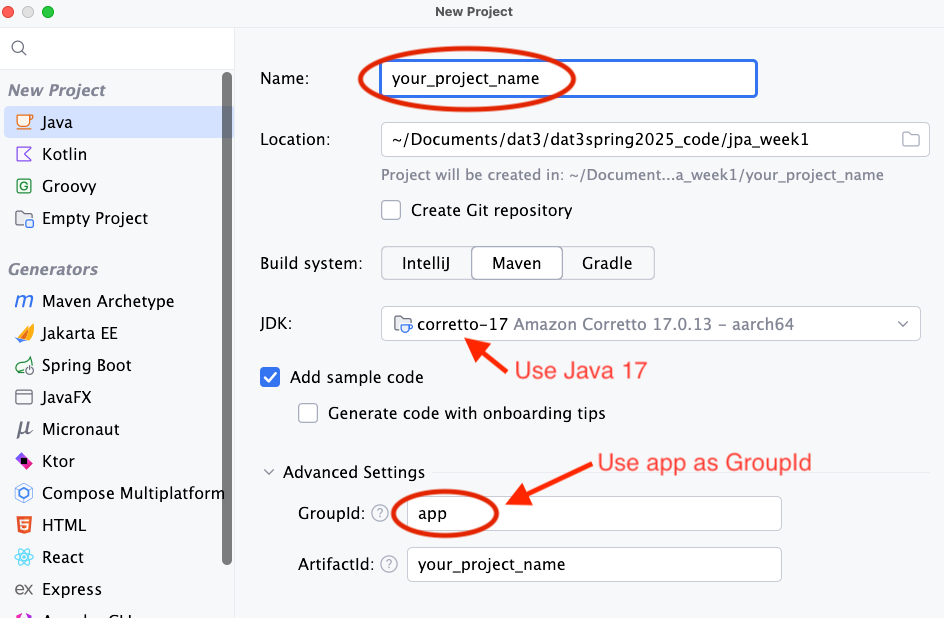
-
Open the
pom.xmlfile and add the following dependencies:<dependencies> <!-- DB --> <dependency> <groupId>org.postgresql</groupId> <artifactId>postgresql</artifactId> <version>${postgres.version}</version> </dependency> <dependency> <groupId>org.hibernate.orm</groupId> <artifactId>hibernate-core</artifactId> <version>${hibernate-version}</version> </dependency> <!-- LOMBOK --> <dependency> <groupId>org.projectlombok</groupId> <artifactId>lombok</artifactId> <version>${lombok.version}</version> <scope>provided</scope> </dependency> <!-- TESTING --> <dependency> <groupId>org.junit.jupiter</groupId> <artifactId>junit-jupiter-api</artifactId> <version>${junit.version}</version> <scope>test</scope> </dependency> <dependency> <groupId>org.junit.jupiter</groupId> <artifactId>junit-jupiter-engine</artifactId> <version>${junit.version}</version> <scope>test</scope> </dependency> <dependency> <groupId>org.junit.jupiter</groupId> <artifactId>junit-jupiter-params</artifactId> <version>${junit.version}</version> <scope>test</scope> </dependency> </dependencies> -
Add the following lines into the properties tag
<lombok.version>1.18.36</lombok.version> <hibernate-version>6.6.6.Final</hibernate-version> <junit.version>5.11.4</junit.version> <postgres.version>42.7.5</postgres.version> -
Create a new java class file called
HibernateConfig(1).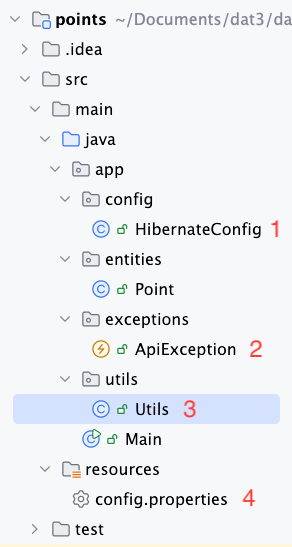
-
Copy and paste the following Link into the
HibernateConfig.class -
The
HibernateConfig.classuses a few methods and classes that are not yet created. You will need to create these classes and methods yourself. Check illustration above to see reference and project structure - and grab the code below:(2) Add the package
exceptionsand add this custom exception class:package app.exceptions; public class ApiException extends RuntimeException { private int code; public ApiException(int code, String msg){ super(msg); this.code = code; } public int getCode(){ return code; } }(3) Add the package
utiland add this class:package app.utils; import app.exceptions.ApiException; import java.io.IOException; import java.io.InputStream; import java.util.Properties; public class Utils { public static String getPropertyValue(String propName, String resourceName) { try (InputStream is = Utils.class.getClassLoader().getResourceAsStream(resourceName)) { Properties prop = new Properties(); prop.load(is); String value = prop.getProperty(propName); if (value != null) { return value.trim(); // Trim whitespace } else { throw new ApiException(500, String.format("Property %s not found in %s", propName, resourceName)); } } catch (IOException ex) { throw new ApiException(500, String.format("Could not read property %s.", propName)); } } }(4) In the
resourcefolder, add a configuration called: `config.properties’:DB_NAME=name_of_your_db DB_USERNAME=postgres DB_PASSWORD=postgres -
Add a proper .gitignore file: